
Learning Technologies
The use of technology to enhance learning, teaching and assessment is a key aspect of the student experience here at Edinburgh Napier University. As such the University provides and supports a range of learning technologies which can be used to help with learning and teaching delivery depending upon the teaching aims of the module or programme.
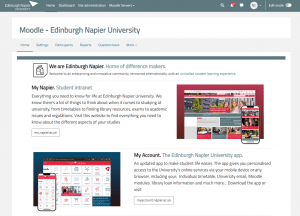


Moodle
Moodle is a learning platform designed to provide educators, administrators and learners with a single robust, secure and integrated system to a create personalised learning environment. Login to Moodle using: University Email Address (name@napier.ac.uk) and University Password. This will take you to your Moodle Dashboard and where you will find links to the modules you are enrolled on. Access to the current Moodle modules you are teaching requires an enrolment, and this is carried out by a contact within your school administration office. They should be consulted in the first instance if you cannot see a module listed on your Moodle dashboard.
Moodle/Microsoft Teams Integration
The University has recently implemented full integration between your Moodle modules, Microsoft Teams and Panopto. You can now easily create a Teams channel for your module and synchronise your academic session recordings with your Panopto folder for viewing, editing and sharing.
Panopto
The University’s lecture recording service is Panopto, this service is fully integrated with Moodle, the University’s VLE. Panopto allows for the simultaneous capture of audio, video, and desktop applications such as PowerPoint. Connect directly to Panopto for ENU
MEDIAL
Medial can be used for short screen recordings and is particularly important for student video assignments. Contact the learning technology team if you are unsure of how to set up student video assignments, as incorrect set up can degrade the performance of the entire Moodle system.
Connect directly to the University online video server (MEDIAL).

Mentimeter
Create a more inclusive environment for your students with Mentimeter. Use a wide range of interactive slides to pose questions, gather feedback, and connect with your audience.Connect directly to Mentimeter for ENU
Padlet
Padlet is a collaborative tool which allows staff to create online boards for students (or anyone) to share information using digital post-it notes that contain text, images, links and other types of media. Connect directly to Padlet for ENUAlly
Ally is a tool that improves the accessibility of digital course files in our Learning Management System (LMS) Moodle. This helps the university to meet its legal responsibilities and ensures that the content we share is easily accessible to as many people as possible.- Alternative formats are automatically generated by Ally from digital course files (Word Docs, PowerPoints, PDFs, Images).
- Ally provides guidance for staff when content needs improvement.